Eye Strain from Computer: Causes, Symptoms & How to Reduce It

Eye strain from computer use is one of the most common problems in today’s digital world. If you experience eye strain on PC, you’re not alone.

Whether you’re working, gaming, or browsing for long hours, prolonged screen time can lead to eye fatigue, headaches, and visual discomfort.

In this guide, you’ll learn:

  • What causes eye strain from computer use
  • The most common symptoms
  • And how to reduce eye strain effectively
  • Why tools like CareUEyes can help make eye protection easier and more consistent

What Causes Eye Strain When Using a Computer

Eye strain using a computer is usually caused by a combination of factors—not just one issue.

Prolonged Screen Time

Focusing on a screen for long periods forces your eyes to work harder than usual.

Reduced Blinking and Dry Eyes

When using a computer, people tend to blink less, which leads to dryness and irritation.

Poor Lighting Conditions

Too much or too little light forces your eyes to constantly adjust, increasing strain.

Screen Settings That Cause Eye Strain on PC

Brightness, contrast, and color temperature all affect visual comfort.

Many users find that manually adjusting these settings is difficult to maintain consistently—especially during long work sessions.

Eye Strain from Blue Light

Blue light from screens can contribute to discomfort, especially at night.

If you’re concerned about this, using a dedicated blue light filter for PC can help reduce unnecessary strain during extended screen use.

Computer Eye Fatigue Symptoms

Computer eye fatigue, also known as digital eye strain or computer vision strain, refers to a group of vision-related symptoms caused by prolonged screen use.

Common signs include:

  • Tired or heavy eyes
  • Dry or irritated eyes
  • Blurred vision
  • Headaches
  • Difficulty focusing
  • Visual discomfort

Why Blue Light Is NOT the Only Problem

While blue light gets a lot of attention, it’s not the main cause of eye fatigue.

More important factors include:

  • Long continuous usage
  • Poor brightness and contrast
  • Lack of breaks
  • Incorrect viewing distance

Focusing only on blue light often ignores the bigger picture.

How to Reduce Eye Strain from Computer

Here are practical ways to reduce computer eye strain:

Follow the 20-20-20 Rule

Every 20 minutes, look at something 20 feet away for 20 seconds to relax your eye muscles.

Adjust Brightness and Contrast

Your screen should match the lighting around you. If it’s too bright or too dim, your eyes will strain.

Using a screen brightness controller can make it easier to maintain comfortable brightness throughout the day.

Optimize Color Temperature

Warmer tones are easier on the eyes, especially in the evening.

Improve Your Workspace Setup

  • Keep your screen 16–30 inches away
  • Position it slightly below eye level
  • Reduce glare from lights or windows

Blink More Often

Consciously blinking helps prevent dryness and irritation.

Why Manual Adjustments Are Not Enough

While these methods help, they require constant attention.

You may:

  • Forget to adjust brightness
  • Skip breaks
  • Work under changing lighting conditions

This is why many people still experience eye strain from PC use.

The Most Effective Way to Reduce Eye Strain

The most practical solution is to automate your screen adjustments.

Use CareUEyes to Protect Your Eyes

A tool like CareUEyes is designed specifically to reduce eye strain from computer use by combining multiple protective features.

It helps by:

Unlike basic system settings, CareUEyes does more than simply change screen color. It can automatically adjust brightness and color temperature, reduce blue light, and use break reminders with lock screen support to help you rest your eyes consistently.

If you spend long hours in front of a computer, CareUEyes can make eye protection easier by combining screen adjustment and enforced rest breaks in one tool.

Final Thoughts on Eye Strain from Computer Use

Eye strain from computer use is extremely common—but also highly manageable.

The key is to:

  • Understand the real causes
  • Improve your habits
  • Use the right tools

Combining simple adjustments with tools like CareUEyes can help you stay comfortable and productive.

Download CareUEyes

Download

Eye Strain from Computer FAQ

What causes eye strain on PC?

Eye strain on PC is usually caused by prolonged screen time, improper brightness, and lack of breaks. Adjusting your screen settings and taking regular breaks can help reduce discomfort.

How long does eye strain from computer last?

It usually improves after resting your eyes, but repeated strain can make symptoms last longer.

Can computer eye strain damage your eyes permanently?

No, it typically doesn’t cause permanent damage, but it can affect comfort and productivity.

What helps eye strain fast?

Taking breaks, adjusting brightness, and looking away from the screen can provide quick relief.

Does Blue Light Cause Computer Eye Fatigue?

It can contribute, but it’s not the main cause—screen habits matter more.

How to Reduce Digital Eye Strain with Eye Care Software

Quick Summary

• Digital eye strain (also known as Computer Vision Syndrome) affects up to 90% of people who work on computers.

• Common symptoms include dry eyes, blurred vision, headaches, neck pain, and difficulty sleeping.

• It is mainly caused by blue light exposure, excessive screen brightness, and reduced blinking during prolonged screen use.

• In most cases, digital eye strain is temporary and improves after resting the eyes.

• Tools like CareUEyes help reduce digital eye strain by filtering blue light, controlling screen brightness, and reminding you to take regular breaks.

digital eyestrain

Digital Eye Strain is increasingly common in today’s digital world. According to the American Optometric Association, between 50% and 90% of people who work on computers experience symptoms of Digital Eye Strain, also known as Computer Vision Syndrome.

Fortunately, you don’t have to give up using computers to protect your eyes. By understanding the causes of digital eye strain and using the right tools, it is possible to significantly reduce eye fatigue and improve visual comfort.

What is Digital Eye Strain?

Digital Eye Strain is a group of eye and vision-related problems that result from prolonged computer, tablet, e-reader, and cell phone use. When we look at screens, our eyes have to work much harder than they do when reading printed text.

Common symptoms of Digital Eye Strain include:

  • Dry, red, or irritated eyes

  • Blurred or double vision

  • Headaches and migraines

  • Neck and shoulder pain

  • Difficulty sleeping (Insomnia)

What Causes Digital Eye Strain?

Digital eye strain is typically caused by three main factors: exposure to high-energy blue light, screen brightness that does not match the surrounding environment, and reduced blinking while focusing on digital screens. Studies show that people blink up to 66% less frequently when looking at a monitor, which can quickly lead to dry and irritated eyes.

Who is Most at Risk?

Digital Eye Strain doesn’t affect everyone the same way. You are at a significantly higher risk if you belong to these groups:

  • Software Developers & Designers: Spending 8+ hours in “Deep Work” mode means your eyes are locked onto high-contrast code or tiny design pixels, leading to severe focus fatigue.

  • Students & Gamers: Long sessions of late-night study or gaming expose your eyes to massive amounts of blue light, which can ruin your sleep quality and focus for the next day.

  • Contact Lens Wearers: Digital screens cause you to blink less frequently. For contact lens users, this leads to rapid lens dehydration, making your eyes feel “gritty,” red, and irritated.

  • Remote Workers: Often working in home environments with suboptimal lighting or improper desk heights, which increases the physical strain on your neck and eyes.

How Long Does Digital Eye Strain Last?

Digital eye strain usually lasts from a few hours to several days depending on how long your eyes were exposed to screens. Most symptoms improve after resting the eyes and reducing screen exposure.

Is Digital Eye Strain Permanent?

Digital eye strain is not permanent in most cases. It is usually a temporary condition caused by prolonged use of computers, smartphones, and other digital screens. Symptoms such as dry eyes, blurred vision, headaches, and eye fatigue typically improve after resting your eyes or reducing screen exposure.

However, if digital eye strain occurs frequently and good eye care habits are not followed, the discomfort can become persistent and significantly affect daily productivity and comfort.

How CareUEyes Helps Reduce Digital Eye Strain

Treating digital eye strain requires a multi-faceted approach because different symptoms are caused by different screen-related factors. CareUEyes is designed as a complete eye protection solution for PC users. By addressing the main causes of digital eye strain—blue light exposure, excessive screen brightness, and prolonged screen focus—it helps relieve common symptoms such as dry eyes, headaches, blurred vision, and sleep problems.

Download CareUEyes

Download

1. Professional Blue Light Filtering

One of the most common symptoms of digital eye strain is difficulty sleeping and eye fatigue in the evening. This often happens because computer screens emit a large amount of short-wavelength, high-energy blue light. Blue light scatters easily in the eye, reducing visual contrast and forcing your eyes to work harder to maintain focus. More importantly, excessive blue light exposure at night suppresses melatonin production, which can disrupt your natural sleep cycle and lead to insomnia.

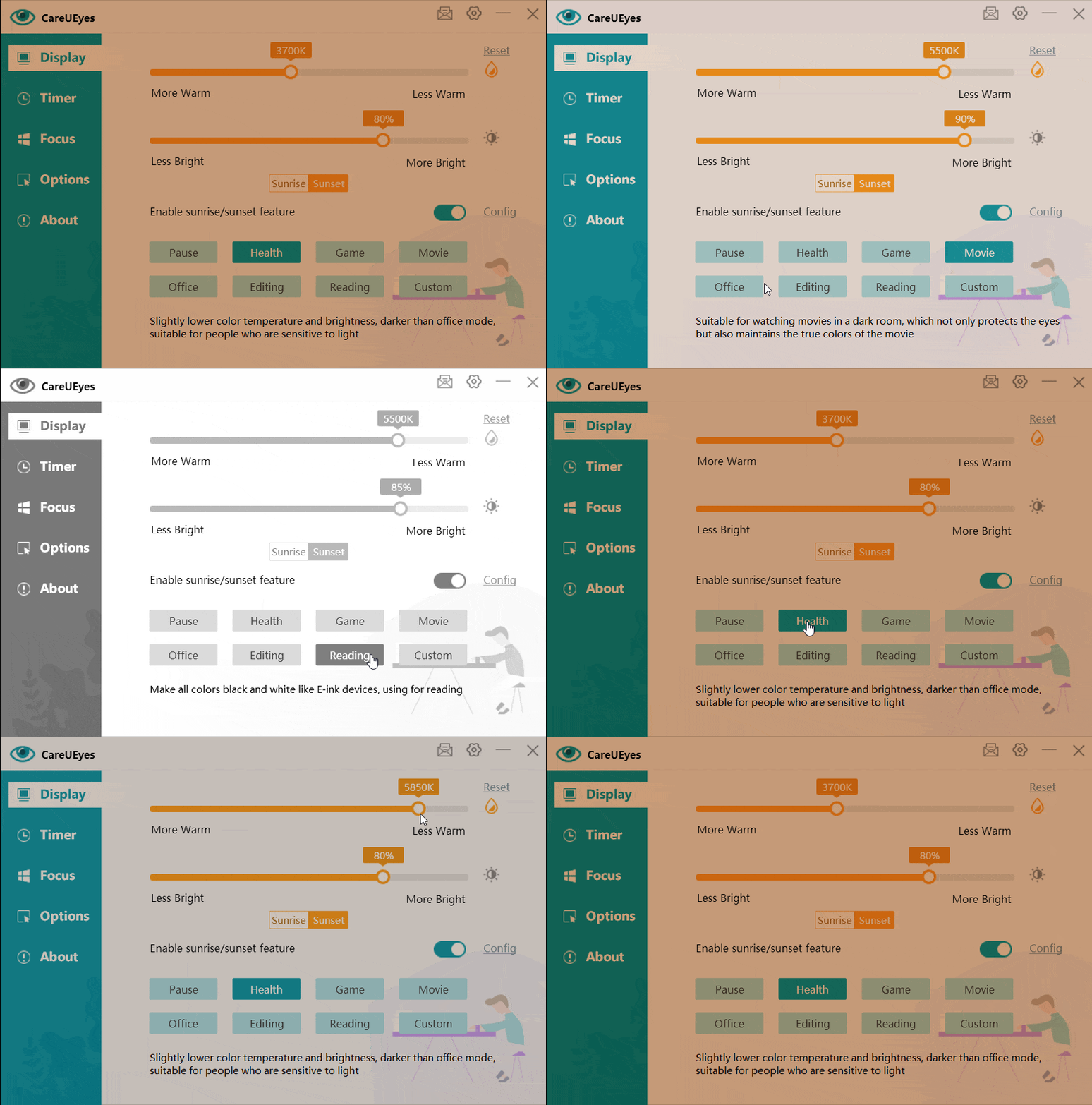
CareUEyes solves this problem with intelligent blue light filtering and color temperature adjustment. By lowering the screen’s color temperature, the software significantly reduces harmful blue light emissions.

For example, CareUEyes can automatically adjust screen color temperature based on local sunrise and sunset times. During the evening and night, the screen becomes warmer with less blue light, which helps your eyes relax and supports healthier sleep patterns.

You can also enable blue light filtering instantly by selecting preset modes such as Office, Health, or Game mode. After choosing a preset, you can further fine-tune the color temperature using the slider to achieve the most comfortable viewing experience.

2. Smart Brightness Control & Screen Dimmer

Another common symptom of digital eye strain is headaches, eye irritation, and blurred vision, which are often caused by screen brightness that does not match the surrounding environment.

For example, looking at a bright monitor in a dark room forces your eyes to constantly adapt to extreme contrast. Over time, this can lead to headaches, red eyes, and visual fatigue. Even worse, many monitors remain too bright even when the hardware brightness is set to 0%.

CareUEyes solves this with advanced screen brightness control and screen dimmer technology. It allows you to fine-tune your screen brightness far beyond normal hardware limits, creating a softer and more comfortable viewing experience.

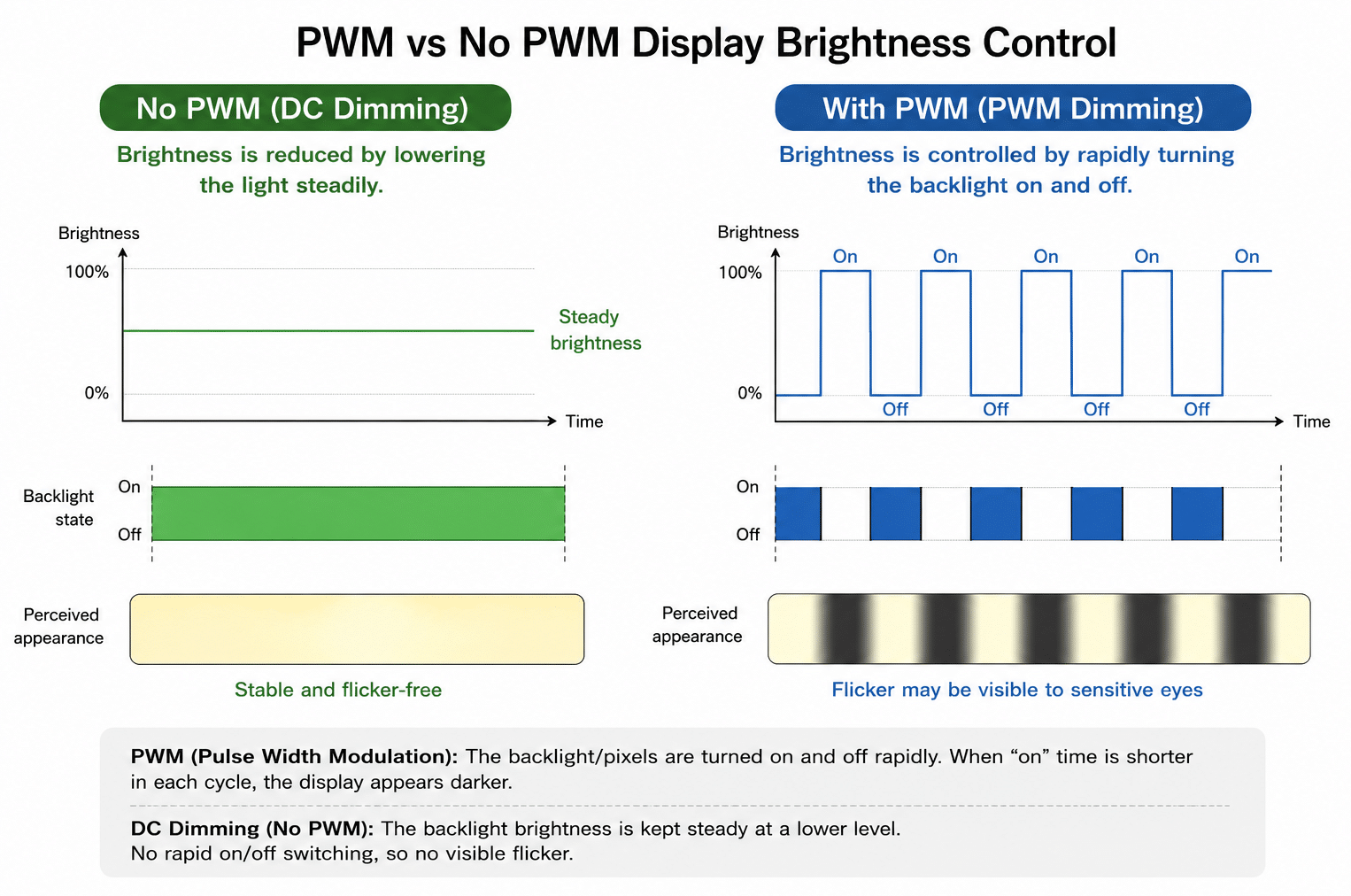
The built-in screen dimmer can safely reduce brightness without flickering, which helps minimize visual strain during long working sessions. In addition, CareUEyes can automatically adjust screen brightness based on local sunrise and sunset times. As evening approaches, the screen gradually becomes dimmer and warmer, which helps reduce eye fatigue and supports healthier sleep.

This significantly reduces symptoms such as eye irritation, headaches, and blurred vision caused by overly bright screens.

3. Automated Break Timer (The 20-20-20 Rule)

Prolonged screen use often leads to dry eyes, eye fatigue, neck pain, and difficulty focusing. This happens because when we stare at screens, our blinking rate drops dramatically.

Eye care professionals recommend the well-known 20-20-20 rule to reduce this strain:
Every 20 minutes, look at something 20 feet away for at least 20 seconds.

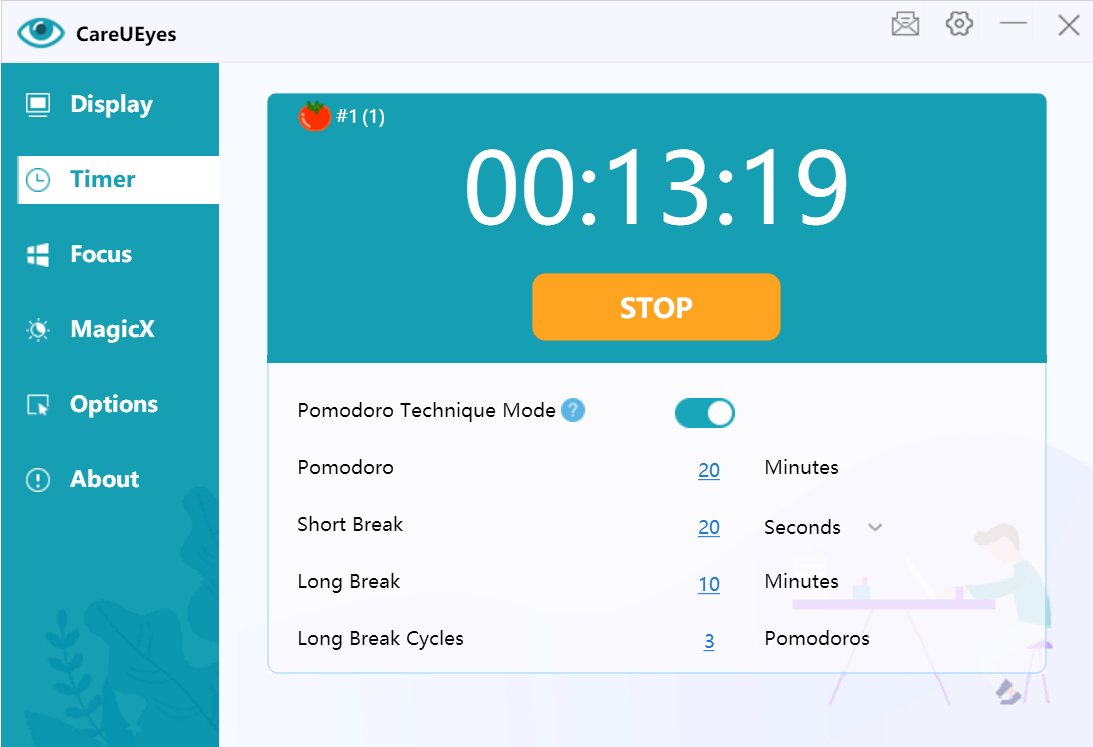
However, remembering to take breaks while concentrating on work is difficult. The CareUEyes Break Timer automates this healthy habit by providing gentle reminders to look away from the screen.

You can set short micro-breaks for quick eye relief or longer breaks to stretch and relax your neck and shoulders. These regular breaks help restore normal blinking, reduce eye dryness, and prevent long-term screen fatigue.

Combined with blue light filtering and smart brightness control, the break timer creates a complete solution for relieving digital eye strain symptoms.


Break timer
Break timer

See the Difference Today

Digital eye strain shouldn’t be accepted as a “normal” part of using a computer. By filtering out harsh blue light, optimizing your screen’s brightness, and reminding you to take vital breaks, CareUEyes provides an all-in-one shield for your vision.

Ready to reduce digital eye strain and protect your vision?

Download CareUEyes today and experience a more comfortable and productive digital life.

Download

🩺 A Note on Your Vision Health

While CareUEyes is a powerful tool designed to significantly reduce digital eye strain and improve visual comfort, it is not a substitute for professional medical advice.

If your symptoms—such as severe blurred vision, persistent headaches, or eye pain—continue even after using eye protection tools and taking regular breaks, we strongly recommend consulting a licensed eye care professional (optometrist or ophthalmologist). Routine eye exams are essential to rule out underlying vision problems and ensure your long-term eye health. Use CareUEyes as your daily shield, but listen to your eyes first.

Eye Saver

Hi, I’m a developer — which basically means I spend more time staring at screens than sleeping. After years of dealing with eye strain, blurry vision at night, and terrible sleep, I finally built something I wish I had a long time ago: Eye Saver, part of the CareUEyes toolkit.


night mode

Download

This isn’t some bloated eye-care app full of pop-ups or gimmicks. It’s a lightweight, no-nonsense tool that filters blue light, dims your screen, and helps you take care of your eyes — quietly, in the background.

Why I Built Eye Saver

If you’re anything like me, your day begins and ends in front of a screen. And after 10–12 hours of work (or gaming), your eyes start begging for mercy. The problem? Windows doesn’t let you dim your screen enough, and most “blue light filter” apps I tried either messed with the colors too much or felt clunky to use.

So I wrote my own solution. One that:

    • Doesn’t break your display colors

    • Doesn’t hog CPU

    • Actually helps you feel better after long hours in front of a screen

blue light filter
Download


What Eye Saver Does

🌈 Filters Blue Light (Without the Weird Orange Tint)

Too much blue light = eye strain + bad sleep. Eye Saver applies a smooth color temperature shift — warm, comfortable tones that reduce glare but keep the screen usable.

🌙 Dims Your Screen (Below System Minimum)

Windows won’t let you go below a certain brightness — but with Eye Saver, you can. This is super useful late at night, especially if you’re in a dark room.

⏱️ Reminds You to Take Breaks (Optional, but Helpful)

We’ve all ignored the 20-20-20 rule (look 20 feet away every 20 minutes for 20 seconds). Eye Saver gives you gentle reminders so your eyes don’t burn out by 6pm.
timer


Download

⚙️ Includes Smart Presets

I added modes for different situations:

    • Reading – Soft and warm

    • Gaming – Dim but clear

    • Office – Balanced for daytime

    • Night – Ultra warm for bedtime coding marathons

You can switch between them or create your own.

🖼️ Doesn’t Affect Screenshots

Big pet peeve of mine: some dimmer apps tint everything — including screenshots. Eye Saver uses gamma  control, so what you see is not what you capture. Screenshots stay normal.

Who’s This For?

    • Developers, designers, writers — anyone who works long hours on screen

    • People sensitive to light or struggling with sleep

    • Students, remote workers, night owls

    • Basically, if your eyes hurt — it’s for you

Lightweight. No Bloat. Just Works.

    • Runs on Windows 11 / 10 / 8 / 7

    • Supports multi-monitor setups

    • Starts with Windows if you want

    • Takes up almost no memory or CPU 

Download

Effective Strategies to Alleviate Dry Eye Syndrome

Dry eye syndrome, a common condition, occurs when your eyes do not produce enough tears or when the tears evaporate too quickly. This leads to discomfort, redness, and vision problems. With increasing screen time, many people find themselves suffering from this condition. Here are some practical steps to alleviate dry eye syndrome:

  1.  Follow the 20-20-20 Rule
    When using a computer or digital device, follow the 20-20-20 rule: every 20 minutes, take a 20-second break and look at something 20 feet away. This simple practice helps reduce eye strain and gives your eyes a chance to relax.
  2. Blink More Frequently
    People tend to blink less often when staring at screens, which can exacerbate dry eyes. Make a conscious effort to blink more frequently to keep your eyes moist. Blinking spreads a fresh layer of tears over your eyes, providing much-needed lubrication.
  3. Use the CareUEyes Software
    CareUEyes is a highly recommended tool for reducing digital eye strain. This software adjusts your screen’s brightness and color temperature to suit the time of day, reducing the blue light that contributes to eye strain and dry eyes. It also includes reminders for taking breaks and exercises to relax your eyes. By using CareUEyes, you can create a more eye-friendly computer environment, significantly alleviating dry eye symptoms.

    Download

  4. Maintain Proper Humidity Levels
    Dry indoor air can worsen dry eye symptoms. Use a humidifier to add moisture to the air in your home or office. This is especially important in winter when indoor heating can reduce humidity levels, leading to drier eyes.
  5. Stay Hydrated
    Drinking plenty of water is essential for overall health, including eye health. Staying hydrated helps maintain the moisture balance in your eyes, reducing dryness and irritation.
  6. Use Artificial Tears
    Over-the-counter artificial tears can provide immediate relief from dry eyes. They help to supplement your natural tear production and keep your eyes moist. However, it’s important to choose preservative-free options to avoid potential irritation from preservatives in some eye drops.
  7. Optimize Your Work Environment
    Adjust your computer screen so that it is at eye level and about 20-24 inches from your face. This positioning helps minimize strain on your eyes. Additionally, ensure that your workspace is well-lit to reduce glare and reflections on your screen, which can contribute to eye strain.
  8. Follow a Healthy Diet
    A diet rich in omega-3 fatty acids, found in fish like salmon and flaxseeds, can help improve the quality of your tears and reduce dry eye symptoms. Additionally, foods high in antioxidants, such as leafy greens and carrots, support overall eye health.

Conclusion

Dry eye syndrome can be a challenging condition, especially in our digital age. However, by incorporating these strategies, including the use of CareUEyes software, you can significantly reduce eye strain and improve your symptoms. Remember to take regular breaks, blink often, and maintain a healthy environment for your eyes. By doing so, you’ll not only alleviate dry eye syndrome but also enhance your overall eye health and comfort.

Prevent Eye Strain with the 20-20-20 Rule

Spending extended periods staring at computer, phone, or tablet screens can strain the eyes. Following the 20-20-20 rule can help prevent this issue.

The rule advises that for every 20 minutes spent gazing at a screen, an individual should take a 20-second break and look at something 20 feet away.

Adhering to this rule serves as a helpful reminder to take frequent breaks, ultimately reducing eye strain caused by prolonged screen time.

This article outlines how to effectively implement the 20-20-20 rule and delves into the research supporting its efficacy, along with additional tips for preventing eye strain.

Implementing the 20-20-20 Rule

The 20-20-20 rule, conceived by Californian optometrist Jeffrey Anshel, serves as a simple cue to take breaks and mitigate eye strain, as noted by the Optometry Times.

Following this guideline entails taking a 20-second break from screen viewing every 20 minutes. During the break, individuals focus their gaze on an object positioned 20 feet away, which helps relax the eye muscles.

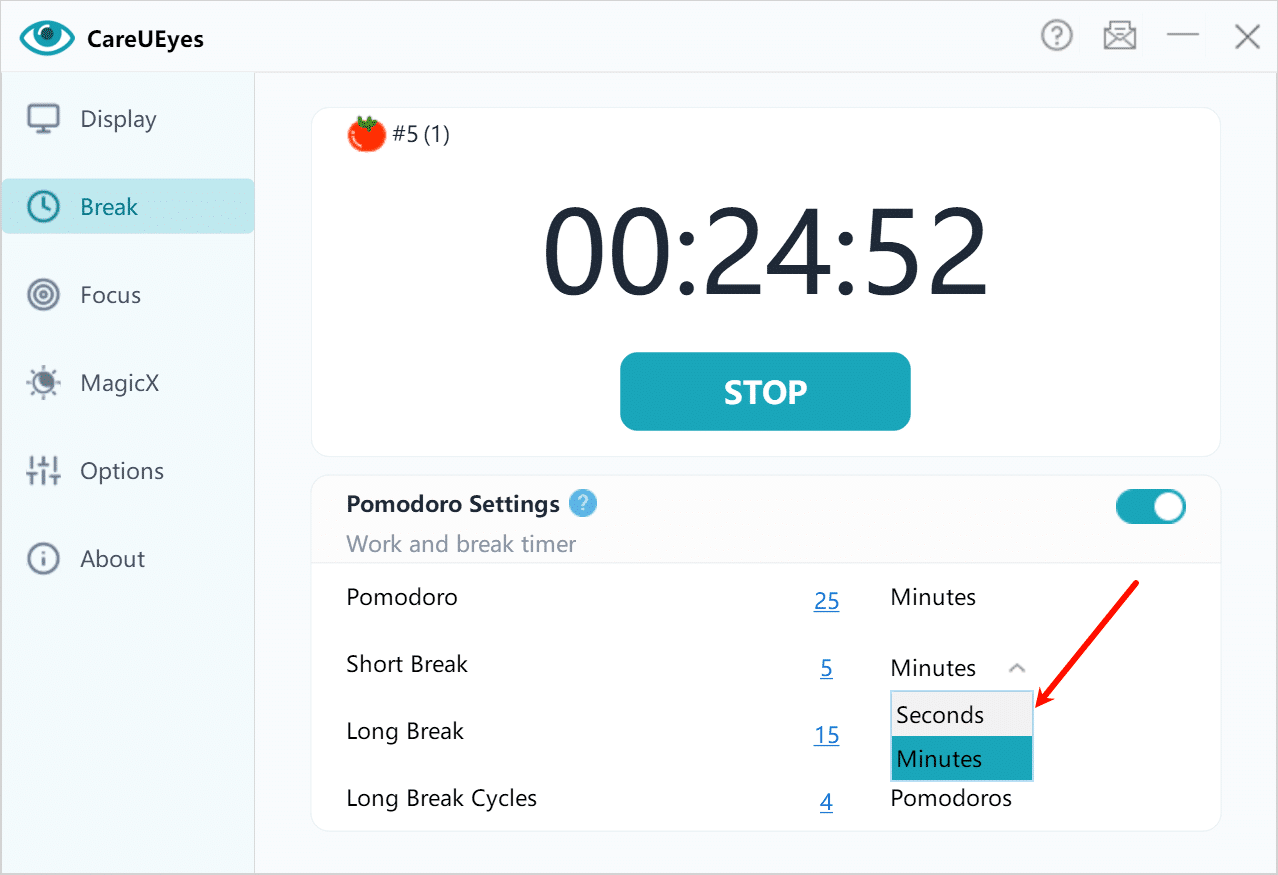
Utilizing CareUEyes facilitates adherence to the 20-20-20 rule:

  1. Activate the Pomodoro Technique mode.
  2. Configure the rest interval to 20 minutes.
  3. Adjust the short break duration to 20 seconds (set the unit to seconds).
  4. Set the long break duration to 5 minutes.
  5. Configure the long break cycles to 3 pomodoros (20*3=60 minutes).

pomodoro 202020


Download

Alternatively, employ the straightforward timer mode:

  1. Disable the Pomodoro Technique mode.
  2. Adjust the rest interval to 20 minutes.
  3. Set the rest duration to 20 seconds (modify the unit to seconds).

pomodoro 202020

More eye protection solutions for CareUEyes

In addition to the 20-20-20 rule, there are more ways to protect our eyes, such as blue light filtering:

    • Blue light filter.

      Blue light  constitutes high-energy, short waves. Prolonged exposure to blue light can induce eye fatigue, dryness, discomfort, and exacerbate myopia. This type of light can directly penetrate the retina via the cornea and lens. Extended exposure to excessive blue light may lead to irreversible retinal damage, including age-related macular degeneration.

      Activating the  blue light filter function can mitigate the harmful effects of blue light on the eyes.

      More Eye Protection Solutions with CareUEyes

      Apart from following the 20-20-20 rule, there are additional measures to protect our eyes, particularly through blue light filtering:

      screen dimmer for night
      Download

      Other Tips for Preventing Eye Strain

      Similar to the 20-20-20 rule, the following techniques can aid in minimizing or preventing eye strain:

      1. Adjust Computer Settings: Enlarging text size by twofold can alleviate eye strain. Opting for black text on a white background is easiest on the eyes.
      2. Minimize Screen Glare: Applying protective anti-glare screens to computers and eyeglasses can help prevent eye issues. Additionally, flat screens typically produce less glare compared to curved ones.
      3. Fine-Tune Screen Contrast: Adjust screen settings to ensure text is readable without causing strain. The ideal contrast may vary depending on the presence of natural light.
      4. Schedule Regular Eye Checkups: Poor eyesight is a significant contributor to eye strain. Regular eye examinations ensure timely updates to prescriptions when necessary.

      Implementing these strategies demands minimal time or financial investment but can effectively reduce eye strain associated with prolonged tablet, phone, and computer usage.

      Download